
Create your first AI video.
An introductory workshop, taught in person with a guide. Start from zero, with explanations in Vietnamese.
The schedule is sent on Zalo.
- No coding experience needed
- Explanations in Vietnamese
- Learn through guided practice
Clever Little Rat: Through the Button Bridge
Leo, Mio and Pip cross a tiny bridge. Observe character movement and how actions are arranged within a short scene.
Watch on YouTubeSilent excerptStudio productions, not student work or promised workshop outcomes. Select play to load YouTube or TikTok. If playback is unavailable, watch directly on the platform.
You have an idea. AI helps you picture it.
A short story, a favourite product or a place you want to visit. Learn to turn your ideas into images and motion.
Start with the intro workshopExpress your ideas clearly
Turn an idea into a clear prompt. Learn which details help guide the AI towards your intention.
Create images with purpose
Explore characters, settings, lighting and camera angles. Learn to spot what needs improving in an image.
Put your story together
Move from still images to motion, then combine scenes, sound and subtitles into a short video.
Your first session, with an instructor.
Explore AI video creation in an in-person session taught in Vietnamese. Ask questions, try each step and find a starting point that works for you.
- Explore the workflow from idea to video
- Practise writing a prompt for a simple scene
- Ask questions and work through challenges with an instructor
- Format
- In person, instructor led, in Vietnamese
- Location
- To be announced
- Schedule
- To be announced
Expressing interest does not confirm a seat. The schedule, location and preparation details will be discussed through Zalo when available.
Free tuition does not include subscriptions or generation credits for third-party AI tools. Tool requirements will be shared before the workshop.
How an AI film is actually made.
Real production material from the studio’s Clever Little Rat series. The workshop introduces each of these stages in a simpler form.

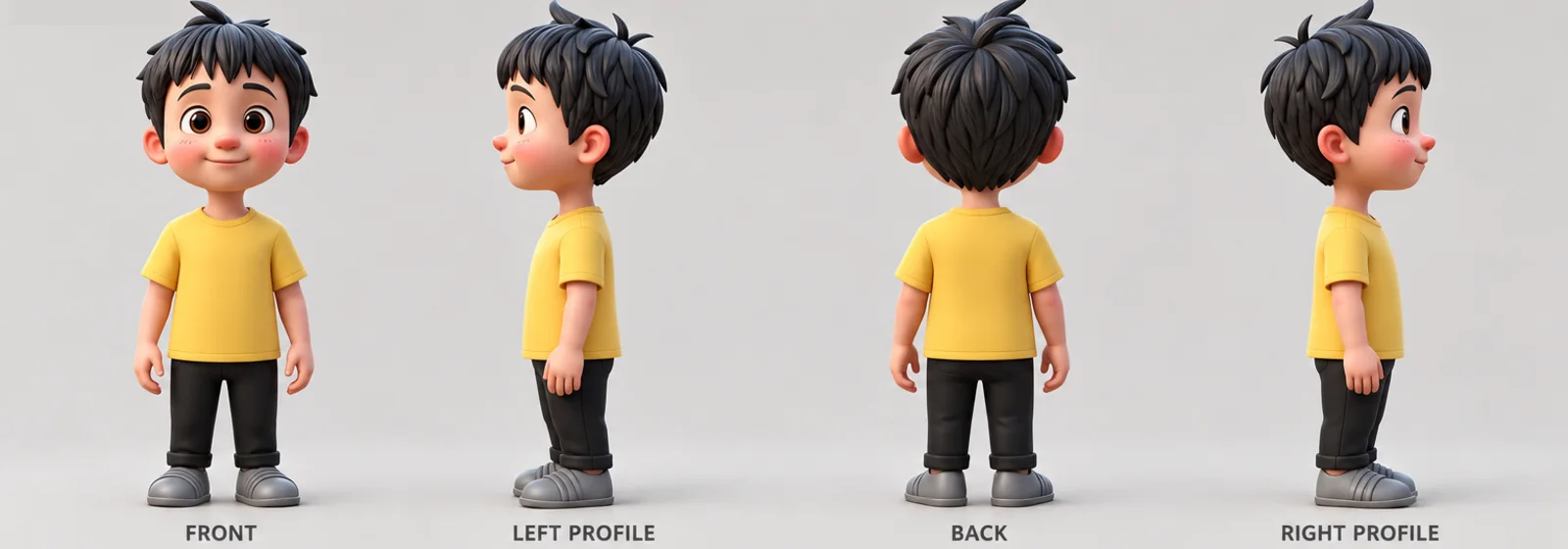
Character sheet
Mio is drawn from four angles, full body and close-up. Every later scene follows this sheet so her shape and fur stay consistent.
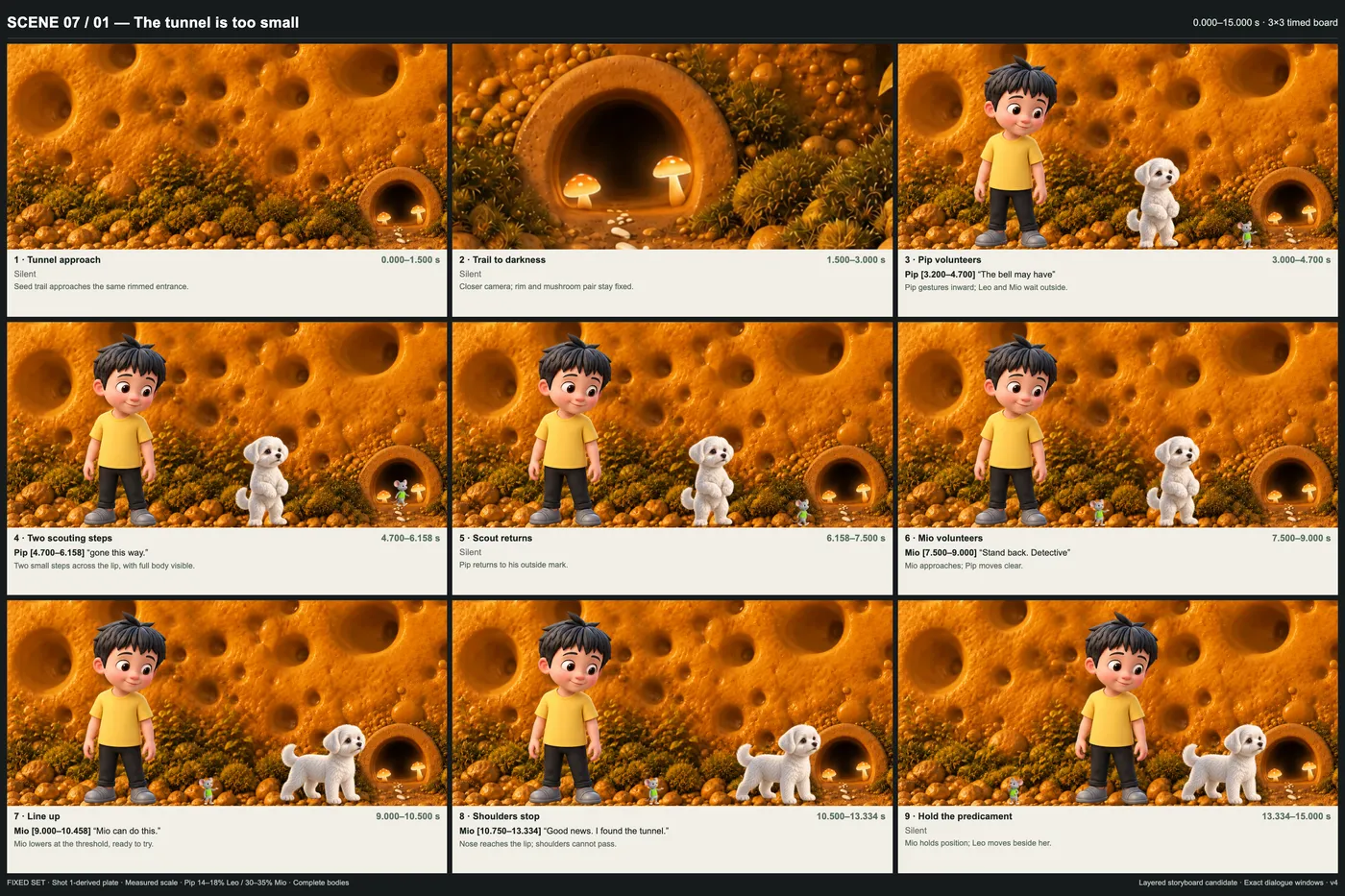
A timed storyboard
A 15-second sequence is split into nine panels, each with its timing, dialogue and action.
@image2 is Leo's strict identity and wardrobe sheet: small boy, warm peach skin, rosy round cheeks, large brown eyes, short tousled black hair, yellow tee, black cuffed trousers, grey shoes. Preserve exact likeness. No beautification. No deformation. Stable face throughout.
An excerpt from the real prompt used for scene 7. It describes the character precisely and tells the AI to keep the face stable. The workshop explains each part in Vietnamese.

Edit scenes, sound and subtitles
Video clips are selected, paced and finished into a short episode.
Watch the studio films
Material from different stages of the project, not a single scene. These are studio productions, not student work.
One step at a time. Understand before moving on.
The broader programme covers the journey from understanding AI to finishing a short video. The intro workshop is an introduction to this way of learning.
Try the first stepStart with the basics
Ideas & prompts
Understand what AI can do, choose a manageable idea and write your first prompt. English terms are explained through Vietnamese examples.
Covered in the intro workshop
Build the frame
Image creation
Describe your subject, setting and lighting. Refine prompts to get closer to your idea while keeping characters consistent.
Tell stories through the camera
The language of film
Explore shot sizes, composition and storyboards. Break a story into scenes you can create.
Bring images into video
Creating motion
Try turning an image into a video. Describe character, camera and background motion, and recognise common issues.
Connect the story
Finishing your video
Choose your scenes, shape the rhythm, and add sound and subtitles. Check the result before exporting it to share.
A place to keep learning.
A self-paced Skool course is in preparation. It will offer another way to review, practise and continue exploring after the workshop.
Have a question?
Starting something new brings questions. Here is what to know before joining.
Can I join if I have never used AI?
Yes. The introductory workshop is designed for beginners. You will explore the workflow, terminology and prompting through simple examples. No coding or filmmaking experience is required.
What language is the workshop taught in?
Teaching is in Vietnamese. Tool names and some buttons may be in English, and the instructor explains them in context. You will learn to understand and adapt prompts, rather than simply copying unfamiliar English text. This English website does not mean English-language teaching is available.
What equipment should I bring?
A laptop with an Internet connection is recommended for practice. Required accounts and tools will be shared before the session. There is no need to buy equipment or paid subscriptions in advance.
Does the workshop include AI tool costs?
No. The introductory workshop has no tuition fee, but AI tool costs are separate. Some AI tools limit free usage or require payment. Requirements and related costs will be shared in advance so you can decide.
Where and when is the workshop?
Check the Workshop section for the latest details. If it says “To be announced”, the date or location is not confirmed. You can express interest through Zalo to discuss a suitable session when dates are available.
Does messaging on Zalo reserve my place?
No. A Zalo message expresses interest. Your place is confirmed only after you and the instructor agree on a specific session.
Does the workshop cover the whole learning path?
The workshop is an introductory experience focused on getting started. The full learning path describes a longer programme. The self-paced Skool course is a separate option; details will be updated when it is ready.
What is your first idea?
Start with a conversation. Tell GenYZ Studio what you would like to create with AI video.
Express interest via ZaloYou will speak with the workshop organiser on Zalo.